
We got a call last week from a shop in Dubai, three machines down, orders backing up. When we reached there, the operator told us the machine had been “a little shaky” for maybe six weeks. There was a weird noise during tool changes for about a month. The alarm had been popping up every few days but it always cleared on reset so nobody thought much of it.
Six weeks of warning signs. And still it caught them off guard.
This is not a rare story. This is basically every emergency call we get. The CNC machine maintenance signs were there the whole time. Someone just needed to know what they meant.
So here is what to look for, from people who show up after the breakdown and work backwards.
Sign 1: The Machine Feels Different When It Runs
Not louder necessarily. Just different. A vibration in the frame that was not there three months ago. Chatter in the cut on a job that used to run clean. That feeling in your hand when you touch the housing during a cycle.
You know your machine better than anyone. Trust that instinct.
CNC machine vibration issues can come from a few different places. Spindle bearings starting to go. A tool holder that is not seating right anymore. Wear on the ballscrews or linear guides that has been building up quietly for months. Before you call anyone, check your feeds and speeds first, swap tool holders, try a different tool. If the chatter follows the machine and not the setup, the machine is the problem.
Here is what makes vibration tricky. It does not stay the same. Worn bearings create more vibration, which accelerates the wear, which creates more vibration. By the time it is loud and obvious you are already deep into the damage. What was a bearing replacement six weeks ago might be a spindle rebuild by the time you act on it.
Feel the machine housing during a dry run. Not listening, feeling. If you feel it, call someone.
Sign 2: Your Scrap Rate Is Quietly Going Up
This one hides well. You adjust an offset, the next batch passes, you move on. But three weeks later you adjust again. And again after that. Meanwhile your inspection time has doubled and nobody has sat down to ask why.
CNC machine accuracy problems that chase one axis are almost always ballscrew wear or backlash. Taper showing up on turned parts usually points to spindle alignment. If the variation is random and inconsistent across a batch, look at thermal drift or workholding that has slowly come loose.
The offset adjustment genuinely frustrates us when we arrive on site. Operators and programmers are smart people and they fix what they can see. But compensating for CNC machine accuracy problems in the program does not fix anything. It just hides the real problem while the wear continues underneath. Six months later the machine cannot hold tolerance even with maximum compensation and now it is a much bigger job.
If your parts held tolerance fine last year and now they do not, and your material and programming has not changed, then, the machine has changed. This is not an offset problem. This is a CNC machine troubleshooting job.
Sign 3: A Sound That Was Not There Before
Grinding when an axis moves. A squeal from the spindle somewhere above 8,000 RPM. A click during tool changes that has started coming every single cycle.
Each of these sounds indicate a specific issue. Grinding on axis travel is the ballscrew or linear rail indicating either contamination or the start of physical damage. Spindle squealing at speed is almost always spindle bearing failure, lubrication breaking down or early damage from contamination. The rhythmic ATC click means the tool changer has wear or alignment issues that are only going to get worse.
Data from Machinery Lubrication says more than half of bearing failures in industrial equipment trace back to bad lubrication. Spindle bearing failure causes a significant set back. Catching it when it is still a squeal is the difference between a maintenance visit and a full spindle rebuild costing five to ten times more.
Record it on your phone next time it happens. Note the axis, the speed, what operation was running and share it with us. The thirty second video can cut the diagnostic time in half.
Sign 4: The Cabinet Is Running Hot
What makes heat dangerous is that electronics do not give much warning. A drive that trips a thermal fault a few times a week is not a good sign. And if the machine is older or the model is less common, sourcing a replacement drive can take weeks.
The single most common cause of overheating in CNC machines is a blocked air filter in the electrical cabinet. Something we see often where heat is involved. The filter gets clogged, airflow drops, heat builds up, drives and electronics run above their rated temperature. Fanuc has this at the top of their preventive CNC maintenance list for a reason. Weeks of downtime can be avoided by proper maintenance and cleaning clogged filters.
Tracking this manually gets challenging. An Annual Maintenance Contract can solve this problem for you.
Sign 5: The Same Alarm Is Coming Back More Often
Operators learn which alarms clear on reset and which ones require stopping the machine. The problem is when a “clears on reset” alarm rings twice a day instead of twice a month.
The change in frequency points to growing mechanical friction, ways getting stiff, ballscrews that need attention etc. Communication errors that appear and disappear suggest cable damage or connector problems that are slowly getting worse. Lubrication alarms that repeat mean the pump or the distribution lines have a real issue that resetting will not fix.
These are signs of CNC machine failure that are easy to miss because each individual alarm seems manageable. The AMT puts unplanned manufacturing downtime at around $250,000 per hour for high-volume operations. Ignored alarms that gave plenty of warning.
Log every alarm, date, time and what the machine was doing. One week of data and a good technician can help avoid machine running problems.
The Real Cost of Waiting
Shops wait because the machine is still running. We get it. Taking something down for preventive CNC maintenance when orders are moving feels like creating a problem that is not there yet.
But look at the actual numbers. A planned maintenance visit costs maybe a few hours of downtime and a known service fee. An emergency breakdown costs emergency rates, parts on rush order, and every hour the floor is silent. The CNC machine downtime causes we deal with most, ballscrew wear, lubrication failures, spindle bearing failure, drive burnout, every single one of them gave weeks of warning before the final failure. The cost difference between catching it early and catching it after is not small. It is usually three to five times the repair bill, not counting lost production.
A machine showing early CNC machine maintenance signs that gets looked at quickly comes back faster, runs better, and lasts longer.
What Your Operators Can Check Without Calling Anyone
Not everything needs a service visit. Here is a basic CNC maintenance checklist your team can run every month.
- Cabinet air filters, check and clean
- Lubrication levels and confirm the system is actually delivering to all points
- Listen and feel for anything that has changed since last month
- Log every alarm with date and time
- Coolant concentration and flow
- Quick visual on cables, connectors, and covers for anything that looks wrong
Call in someone when you see any of these:
- Vibration or noise that does not go away when you change tools or adjust parameters
- Accuracy drifting repeatedly even after you correct it
- Thermal alarms with no obvious cause
- Any alarm appearing more than once a week
- Grinding from axis travel at any speed
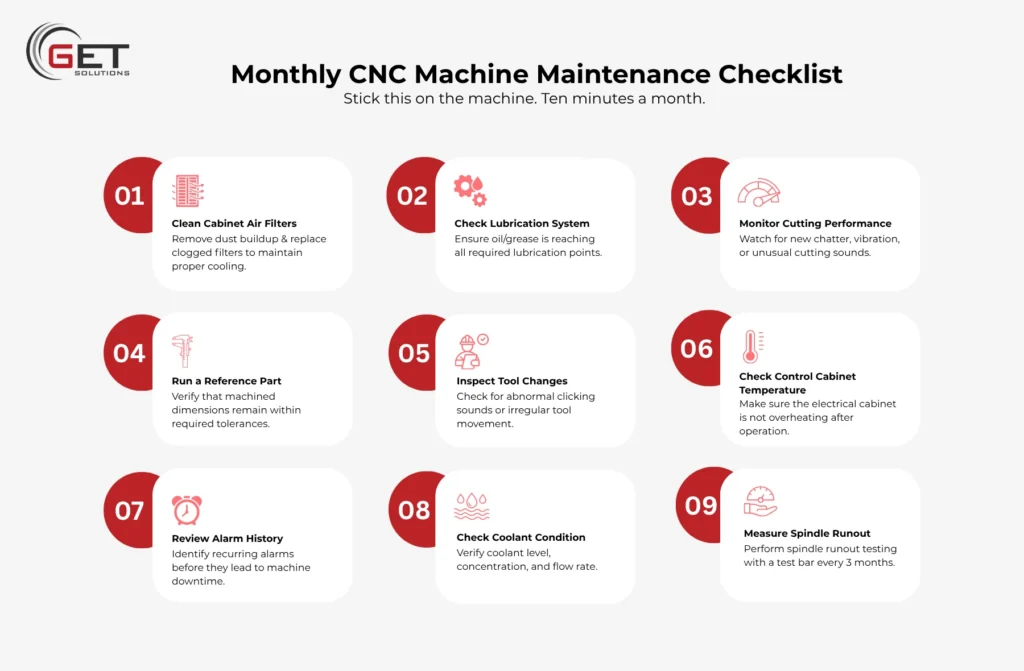
Monthly CNC Machine Maintenance Checklist
Stick this on the machine. Ten minutes a month.
- [ ] Cabinet air filters cleaned or replaced
- [ ] Lube system delivering to all points
- [ ] No new chatter or vibration in cuts
- [ ] Ran a reference part, dimensions still where they should be
- [ ] Tool changes sound normal, no new clicking
- [ ] Cabinet not hot after a full shift
- [ ] Alarm history checked, nothing repeating
- [ ] Coolant level, concentration, and flow checked
- [ ] Spindle runout, do this one quarterly with a test bar
About Get Solutions
Get Solutions is CNC maintenance and repair company. We work across the UAE with machine shops in aerospace, automotive, precision manufacturing, and general engineering. Our engineers have hands-on experience across Fanuc, Siemens, Mitsubishi, and most other major control platforms. Between CNC retrofitting and maintenance, same-day electromechanical troubleshooting, and structured Annual Maintenance Contracts for shops that want proper preventive coverage, most of what we do is keeping machines running before something goes wrong.
We also handle machine layout planning, process flow improvement ,turnkey shop setups, and reverse engineering when a component needs redesigning or replacement.
If something on your machine has been nagging at you, that feeling is usually right.
Frequently Asked Questions:
1. How often does a CNC machine actually need servicing?
Manufacturers say every 500 to 1,000 running hours, or once a year minimum. If you are pushing the machine hard, once a year is not enough. We do AMC plans built around your production schedule so it does not turn into a panic every time.
2. What actually causes most CNC machine breakdowns?
Honestly? Things that were ignored. Lubrication that stopped reaching where it needed to. Ballscrew wear that built up over a year. A bearing that was making noise for months. The CNC machine downtime causes are almost always preventable in hindsight, which is the frustrating part.
3. Repair versus preventive maintenance, what is the actual difference?
Repair is after something breaks. Preventive CNC maintenance is before it breaks. Preventive costs less, takes less time, and means you choose when the machine is down instead of the machine choosing for you. Most shops only get serious about preventive maintenance after their first big repair bill.
4. My machine is acting up, can I keep running it?
Depends what it is doing. Slight accuracy drifts with monitoring, maybe for a little while. Grinding from axis movement, spindle noise, thermal alarms repeating, no. Those symptoms get worse under production load, not better. Get someone to look at it before the next job.
5. How do I actually check for ballscrew wear myself?
Clamp a dial indicator against the axis. Jog back and forth in small increments and watch for the gap between when you command movement and when the axis actually moves. That gap is backlash. Your machine manual has the tolerance limit. If you are past it, the ballscrew needs proper attention.
6. What does a full service cover versus a basic tune-up?
Full service is mechanical, ballscrews, guides, spindle, plus electrical, drives, cables, safety systems, plus lubrication and coolant. Tune-up is lighter, mainly calibration and parameter work. Contact us and we will tell you honestly which one your machine actually needs.
7. Do you work outside Dubai?
Yes. UAE-wide and wider GCC region. Send us a message with your location.